
/المدونة
نشارككم أحدث ابتكارات التقنية، أسرار تجربة المستخدم، وأدوات الميديا الرقمية.
اكتشف عالم التقنية والابتكار مع مقالاتنا المتجددة.

2026-08-20
Mobile Development

ENG - Nourhan MaghawryTrainee - Mobile applications developer
How to Choose the Right State Management in Flutter
Choosing a state management approach is one of the decisions that can shape how a Flutter application feels to develop and maintain. Different projects need different levels of structure, so the right choice should come from the feature requirements rather than from trends. The following guide focuses on practical decisions that help developers keep Flutter applications readable, testable, and ready to grow.
Start With the Problem
- State management should begin with a clear understanding of the problem, not with a preference for a popular package. Ask what data changes, who needs it, and how long that state must remain available. A counter on one screen has very different requirements from authentication, shopping carts, orders, or live API data shared across many screens. The simplest solution that remains clear is usually the strongest starting point.
Use setState for Local State
- setState is often enough when state belongs to one widget and does not need to be shared elsewhere. It keeps the implementation small and is useful for simple UI interactions such as toggles, selected tabs, or temporary form values. The goal is not to avoid setState; it is to use it intentionally. Moving every small piece of state into a global solution can add unnecessary layers, files, and mental overhead to an otherwise simple screen.
Consider Provider for Simplicity
- Provider can be a practical choice when an application needs dependency sharing and reactive updates without introducing a more structured event-and-state architecture. It can work well for straightforward features and teams that value a relatively lightweight approach. The important consideration is how the state will evolve. If business logic becomes complex, shared across many flows, or difficult to test, a more structured approach may provide clearer boundaries and easier long-term maintenance.
Choose Cubit for Clear Flows
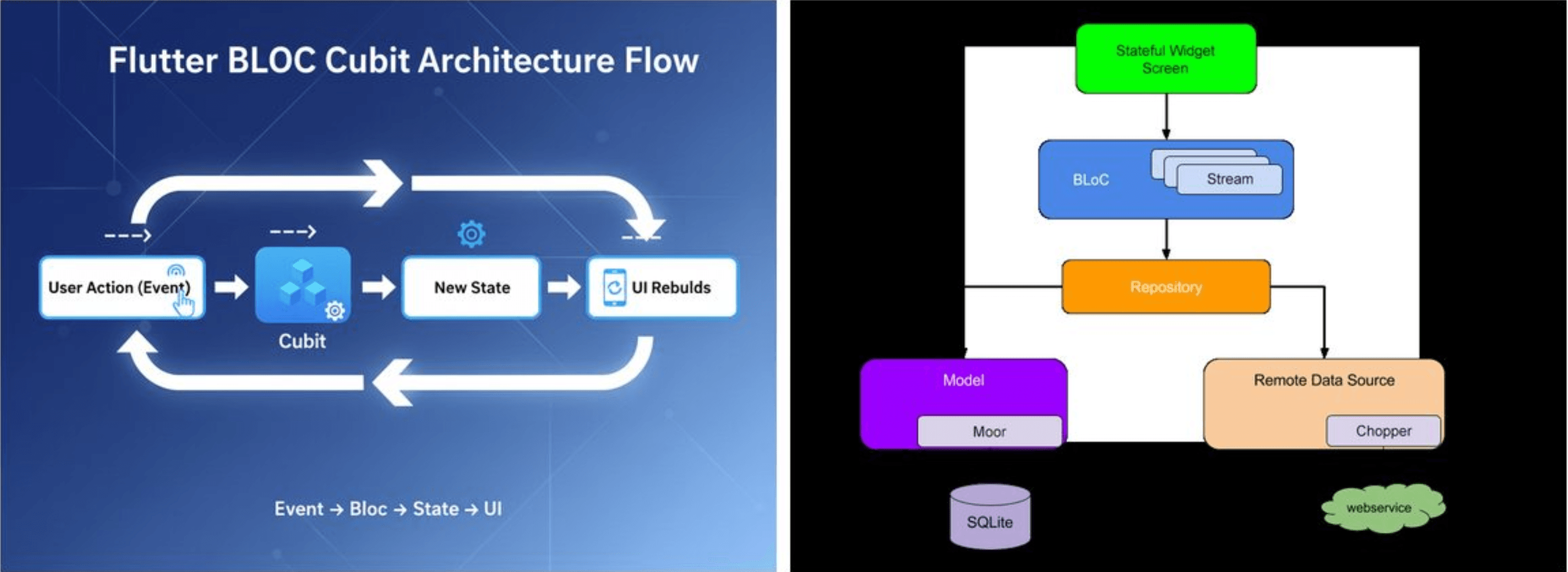
- Cubit is useful when you want explicit state transitions while keeping the amount of boilerplate relatively low. A Cubit exposes methods that perform actions and emit new states, making many common application flows easy to read and follow. For example, loading a profile can move through initial, loading, success, and failure states. The UI can react to those states without containing the API or business logic itself, which keeps screens easier to maintain.

Use BLoC for Complex Events
- BLoC is a strong option when a feature contains many user or system events that need predictable handling. Events provide a clear input layer, while states describe the results that the interface should render or react to. This structure can be especially helpful in larger applications where multiple developers work on the same feature. Separating events, business logic, and states makes behavior easier to trace, test, and change without placing too much logic inside widgets.
Think About Shared State
- Before choosing a solution, identify whether state is local to a screen or shared across multiple parts of the application. Authentication, cart data, user preferences, and order status are examples that may need consistent access from different screens. Shared state should have a clear owner and lifecycle. When ownership is unclear, developers can accidentally duplicate data, trigger unnecessary rebuilds, or create dependencies between widgets that become difficult to understand as the application grows.
Keep API Logic Outside UI
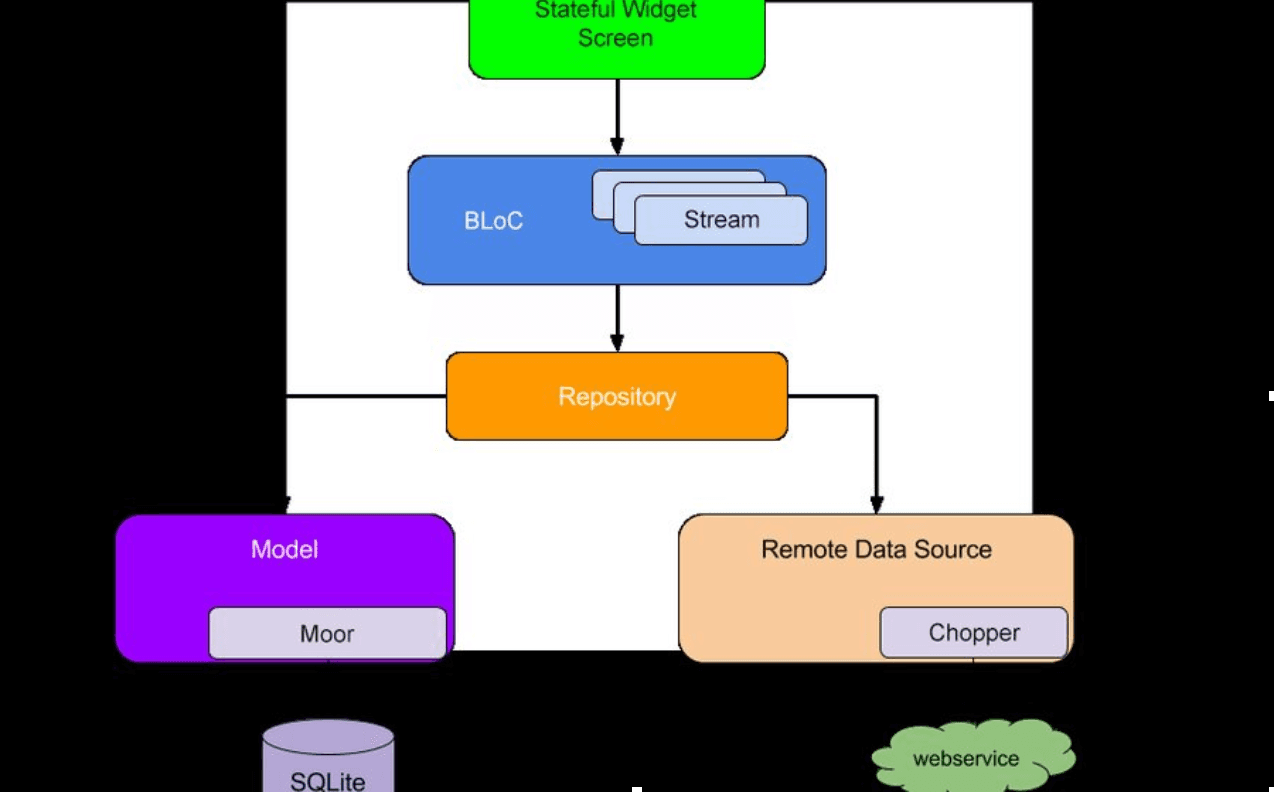
- A state management solution should not turn the UI into a networking layer. Screens should describe what the user sees and responds to, while repositories or dedicated services handle API communication and data access. A clean separation makes failures easier to handle and testing easier to perform. It also allows the backend implementation to change without forcing every screen that consumes the data to be rewritten.
Design for Testing
- Testing should influence the architecture from the beginning. When business rules live inside a state management layer instead of inside widgets, developers can test state transitions and feature behavior without depending on the complete visual interface. A good state management choice should therefore make expected behavior obvious. If you can describe a feature as inputs, operations, and resulting states, you are already creating a structure that is easier to verify.
Match the Team and Project
- The best state management solution is also one the team can use consistently. A technically powerful architecture can become a problem if developers do not understand its conventions or introduce different patterns across similar features. Project size matters as well. A small app may benefit from simplicity, while a large product may need stronger boundaries, predictable state transitions, dependency injection, and testing practices. Architecture should grow with real complexity.
Choose for Maintainability
- State management is not about selecting a winner between packages. The better question is which approach keeps the current code understandable while leaving enough structure for future features, new developers, testing, and changing business requirements. A useful rule is to start simple, measure the complexity of the feature, and introduce stronger structure when it provides clear value. Good architecture reduces friction rather than adding technology for its own sake.